
Automatisoitu käännös tarjoaa perustan, mutta täydellinen lokalisointi vaatii usein vivahteita. MultiLipi integroi Generatiivinen ehdotusmoottori suoraan muokkaustyönkulkuusi. Tarvitsetpa sitten otsikon lyhentämistä mobiilinäytön sovittamiseksi tai lakitekstin muotoilemista muodollisemmaksi, voit käynnistää tekoälyn uudelleenkirjoitukset kolmessa eri ympäristössä.
Tämä opas kuvaa toimintaprotokollat Rinnakkaiseditori, Virtuaalinen editori, ja Variability Engine.
1. Side-by-Side Editor (Precision Workbench)
Koodinäkymäympäristö yksityiskohtaista hallintaa varten.
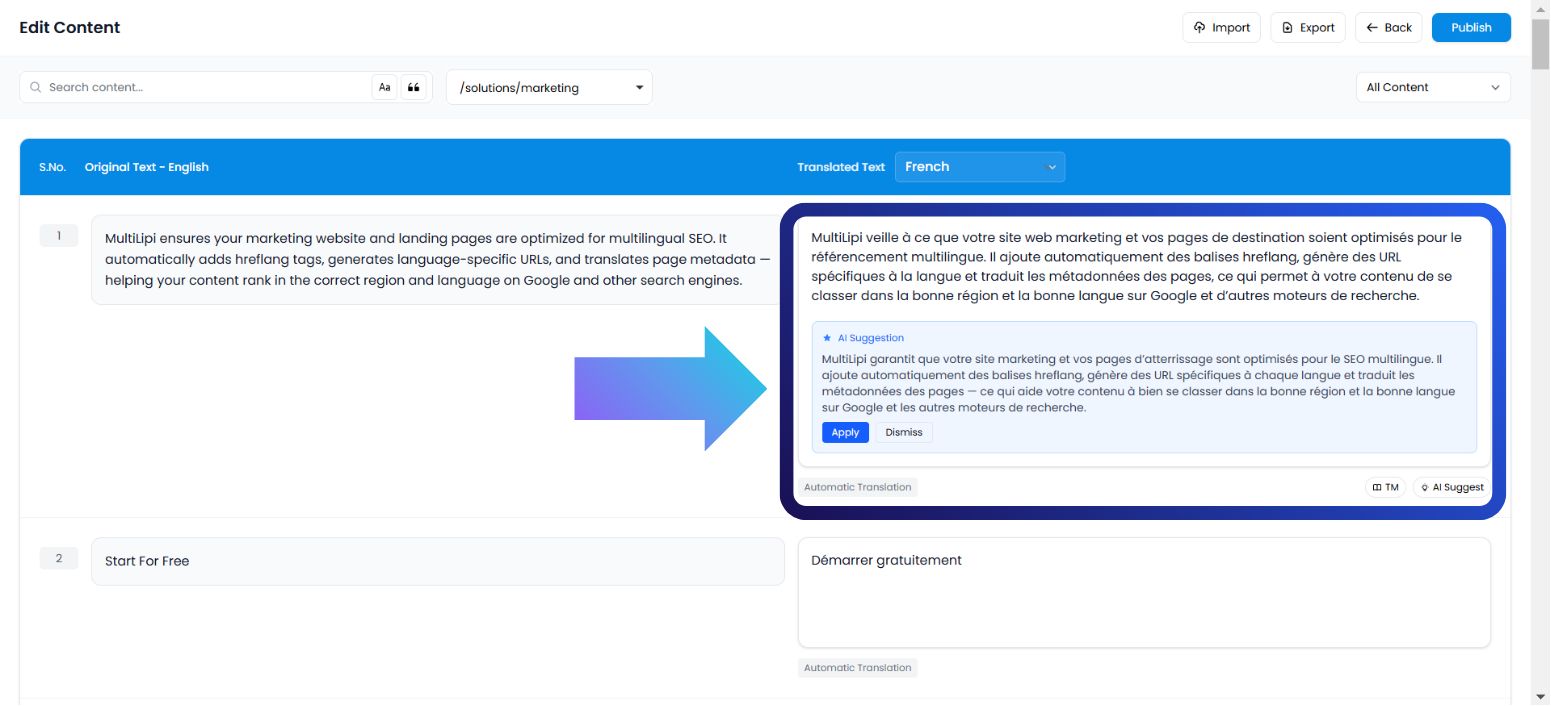
Tämä käyttöliittymä näyttää sisältösi jäsenneltynä luettelona tekstipareja (lähde vs. kohde). Se on ihanteellinen ympäristö kielitieteilijöille tai toimittajille, joiden on keskityttävä pelkästään tekstiin ilman visuaalisia häiriötekijöitä.
Käyttötapaus:
Tietyn lauseen uudelleenmuotoilu SEO-ystävällisemmäksi tai kieliopillisen vivahteen korjaaminen tiheässä kappaleessa.
Suoritusprotokolla:
Käytä kojelautaa: Kirjaudu sisään MultiLipi-komentokeskukseesi.
Valitse projekti: Napsauta tiettyä projektiruutua.
Siirry: Avaa Kielet välilehti.
Käynnistä käyttöliittymä: Valitse Rinnakkaiseditori vaihtoehdoista.
Käynnistä tekoäly: Paikanna tietty tekstilohko. Napsauta käännetyssä sarakkeessa (oikea sarake) AI-ehdotus -painiketta.
Sitoumus:
Käytä: Korvaa nykyisen tekstin tekoälyversiolla (kuluttaa kiintiötä).
Hylätään: Hylkää ehdotuksen (ei kustannuksia).
2. Virtuaalinen editori (Overlay Environment)
WYSIWYG (What You See Is What You Get) -konteksti.
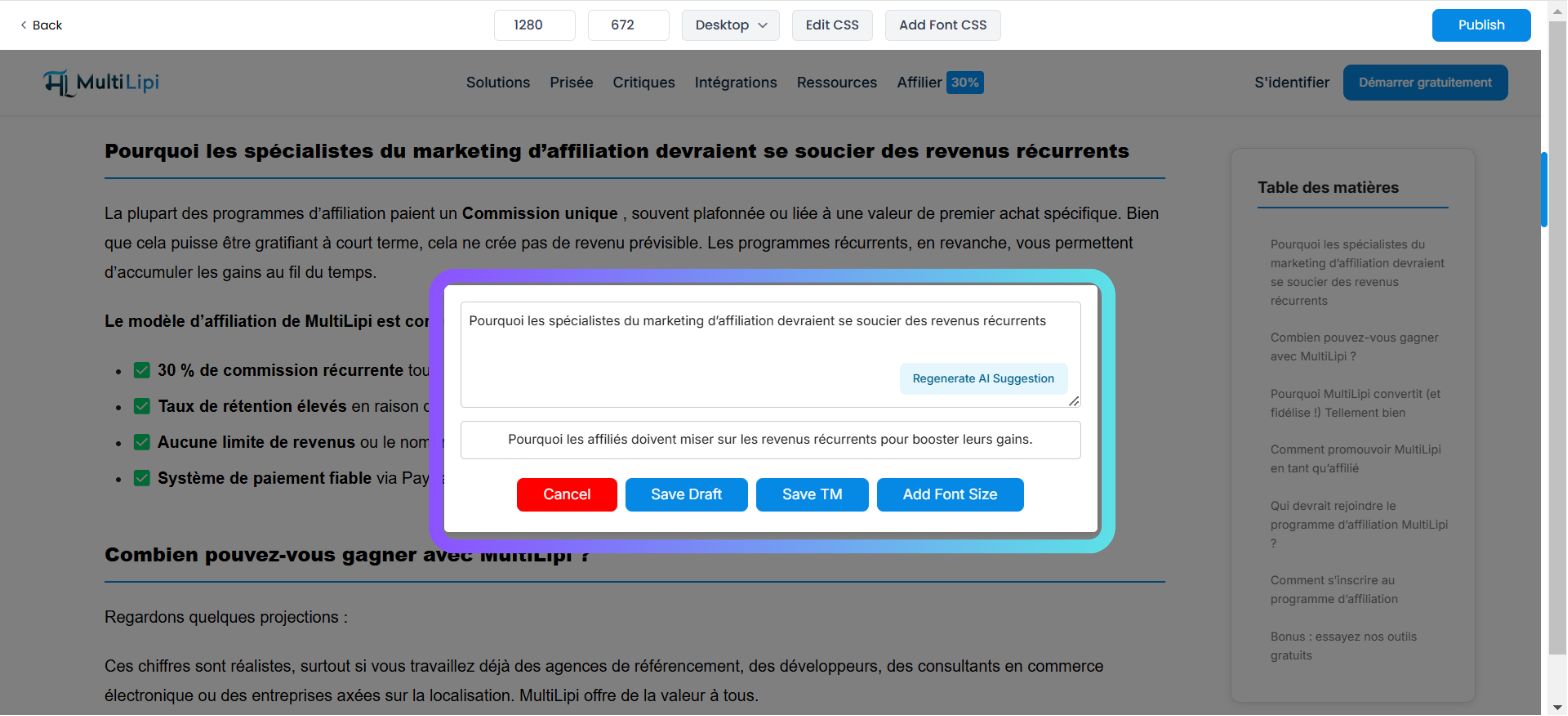
Tämä käyttöliittymä asettaa käännöskoneen verkkosivustosi päälle. Sen avulla voit muokata tekstiä "paikallaan", varmistaen, että uusi käännöksesi sopii painikkeiden, bannerien ja valikkojen visuaalisiin rajoihin.
Käyttötapaus:
Blogiotsikon lyhentäminen, joka rikkoo asettelua, tai toimintakehotuksen (CTA) uudelleenkirjoittaminen iskevämmäksi.
Suoritusprotokolla:
Siirry: Siirry kojelautaan → Projektit → URL-osoitteet.
Käynnistä esikatselu: Napsauta Muokkaa painikkeen alla Virtuaalinen esikatselu sarake tietylle sivulle.
Valitse elementti: Vie hiiren osoitin muokattavan tekstilohkon päälle ja napsauta sitä live-esikatselussa.
Käynnistä tekoäly: Napauta AI-ehdotus painikkeen ponnahduspalkissa.
Sitoumus: Tarkista luotu vaihtoehto ja napsauta Käytä jos se sopii asetteluusi.
3. Vaihtelumallimoottori (Tyylillinen monimuotoisuus)
Semanttisten vaihtoehtojen luominen.
Joskus yksi käännös ei riitä. Vaihtelumallimoottori luo useita tyylillisiä versioita samasta lauseesta, jotta voit valita sen, joka sopii parhaiten brändisi äänensävyyn (esim. Ammattimainen vs. Vakuuttava vs. Tiivis).
Käyttötapaus:
A/B-testataan erilaisia markkinointikoukkuja laskeutumissivun otsikolle.
Suoritusprotokolla:
Käytä asetuksia: Avaa projektisi kojelauta.
Siirry: Etsi AI-tila osio sivupalkissa.
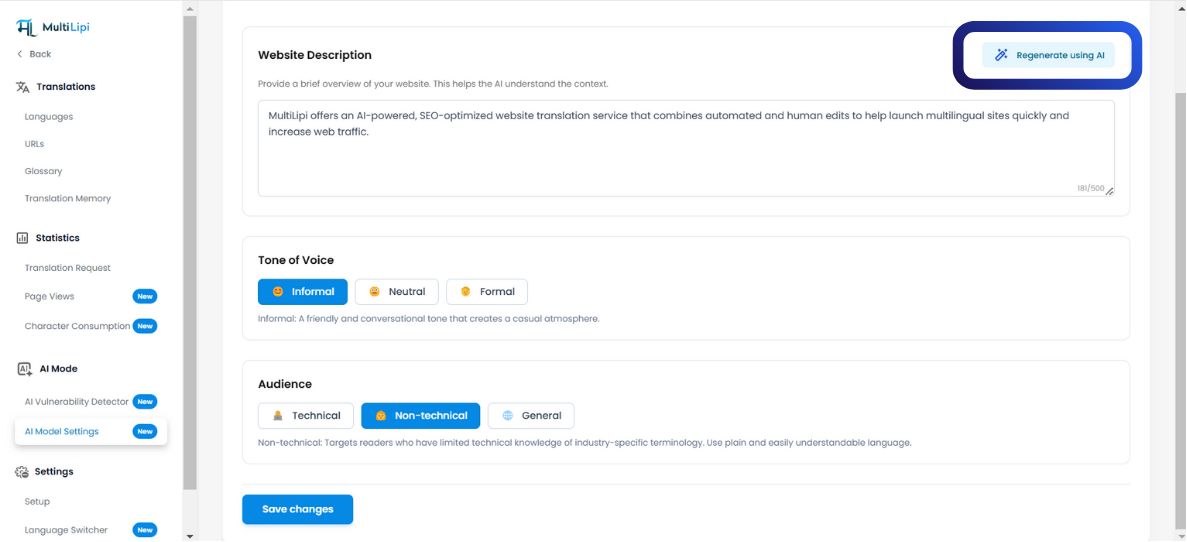
Määritä: Napsauta Tekoälymallin asetukset -kuvaketta.
Luo: Valitse haluamasi AI-sisältömuoto. Järjestelmä esittää useita muunnelmia lauserakenteen perusteella.
Nopea Käyttöön Otto: Valitse haluamasi versio päivittääksesi käännösmuistin välittömästi.
4. Kiintiönhallinta (Laskutuslogiikka)
Generoinnin kustannusten ymmärtäminen.
On ratkaisevan tärkeää ymmärtää, milloin krediitit vähennetään suunnitelmastasi.
| Toiminto | Kiintiön vaikutus |
|---|---|
| Näytä Ehdotus | Ilmainen. Esikatselun luominen ei kuluta krediittejä. |
| Käytä ehdotusta | Laskutettava. Kiintiö vähennetään vasta, kun napsautat "Käytä". |
| Hylkää ehdotus | Ilmainen. Tekoälyn luonnoksen hylkääminen ei maksa mitään. |
Suunnitelman huomautus:
Ilmaisilla tasoilla on tiukat rajat tekoälyn sanankulutukselle. Maksulliset tasot tarjoavat laajennettuja tai rajoittamattomia luontirajoja yrityssopimuksestasi riippuen.