
Globaalissa infrastruktuurissa, kitka on konversion vihollinen. Jos pariisilainen käyttäjä vierailee sivustollasi, hänen ei pitäisi joutua etsimään manuaalisesti lippuikonia vaihtaakseen ranskaksi. MultiLipi:n Kävijän kieliohjain toimii älykkäänä liikenteenohjaajana. Se tarkastaa saapuvan pyynnön Accept-Language otsakkeen (selaimen paikalliset asetukset) ja reitittää käyttäjän välittömästi vastaavaan lokalisoidulle sivustosi versioon (esim. fr.yoursite.com).
Tämä opas kuvaa määritysprotokolla tämän automatisoidun reitityskerros mahdollistamiseksi.
1. Reitityksen logiikka
Kuinka tunnistus toimii.
Tunnistus:
Käyttäjä saapuu sivustollesi.com.
Tarkastus:
Moottori lukee selaimen asetukset (esim. fr-FR).
Reititys:
Jos ranska on projektissasi aktiivinen kieli, järjestelmä suorittaa välittömästi 302-väliaikaisen uudelleenohjauksen ranskalaiselle aliverkkotunnukselle.
Varajärjestelmä:
Jos käyttäjän kieltä ei tueta, hän pysyy oletuskielellä (lähdekieli).
2. Konfiguraatioprotokolla
Ota tämä ominaisuus käyttöön suoraan projektisi komentokeskuksesta.
Vaihe 1: Käyttöliittymän avaaminen
- •Kirjaudu sisään MultiLipi -hallintapaneeliisi.
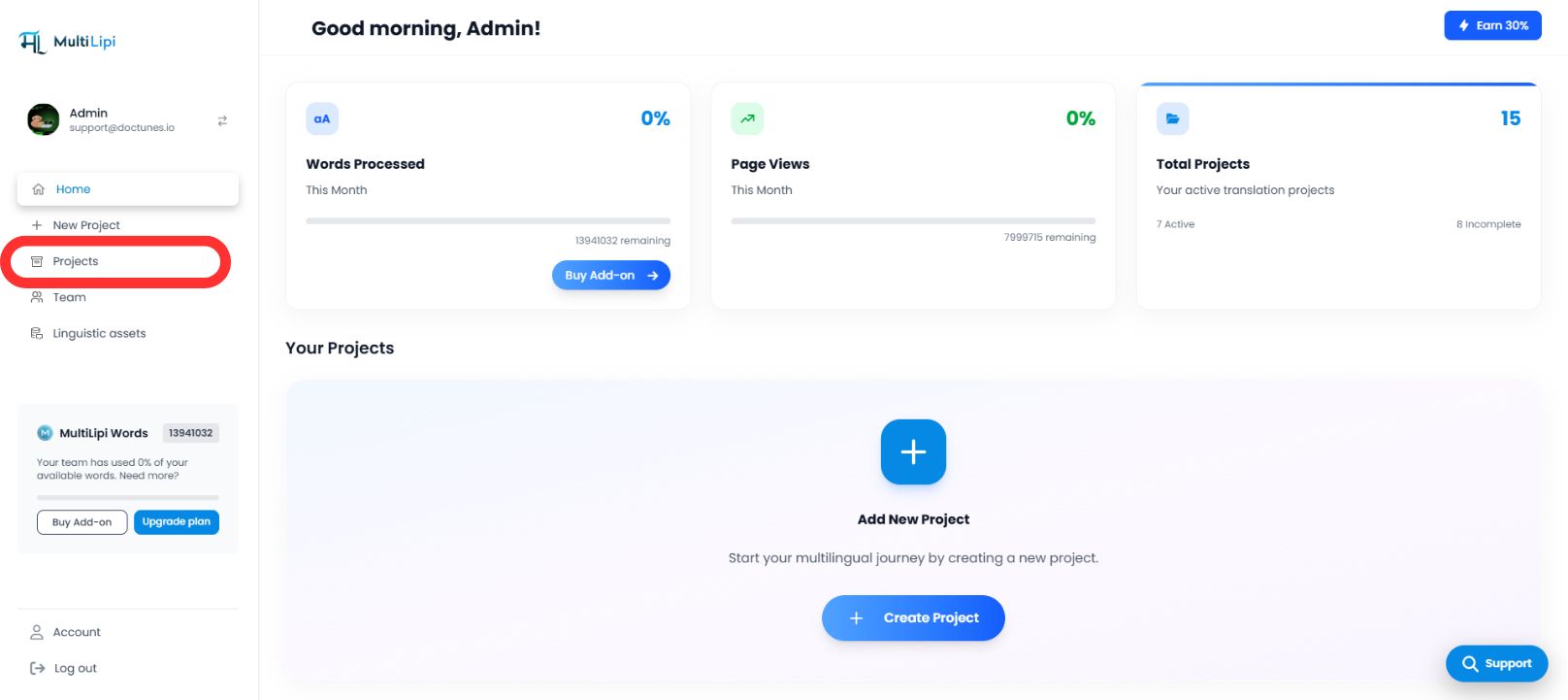
- •Siirry vasemmanpuoleiseen sivupalkkiin ja napsauta Projektit nähdäksesi aktiivisen portfoliosi.
Vaihe 2: Valitse kohdeprojekti
- •Paikanna tietty verkkotunnus, jonka haluat määrittää.
- •Napsauta Projektilaatta siirtyäksesi sen erityiseen hallintakonsoliin.
Vaihe 3: Käynnistä asetusten määritys
- •Napsauta projektinäkymän vasemmassa sivupalkissa Asetukset.
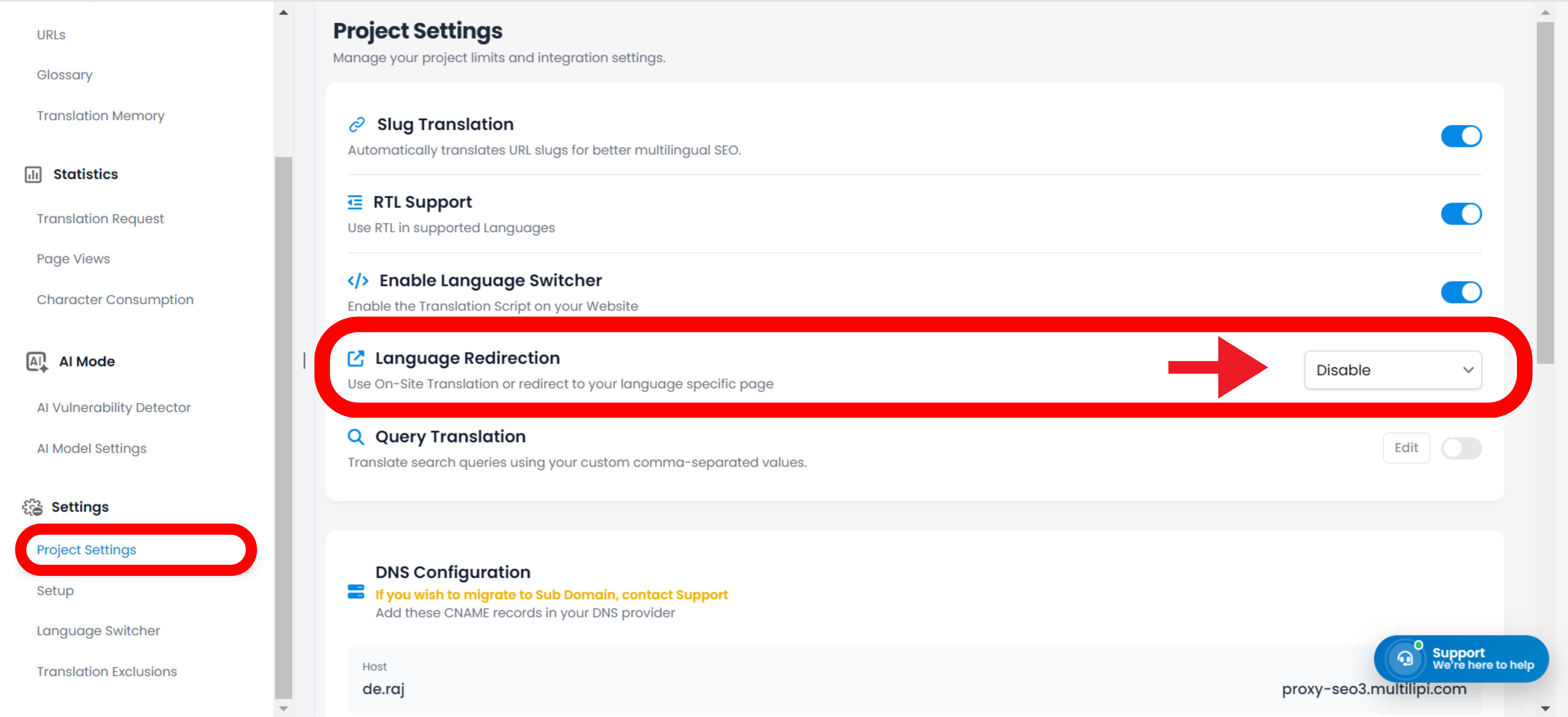
- •Valitse avattavasta luettelosta tai alivalikosta Projektin asetukset.
Vaihe 4: Aktivoi reititys
- •Vieritä asetuspaneelia alaspäin, kunnes löydät "Käyttäjän kielten uudelleenohjaus" vaihtoehto.
- •Toiminto: Vaihda kytkintä
PÄÄLLÄ. - •Järjestelmän vastaus: Reititysgeneraattori on nyt aktiivinen. Uudet kävijät ohjataan automaattisesti selaimen asetusten perusteella.
Määritys valmis – Reititysgeneraattori aktiivinen
3. Strategiset edut
Miksi automatisoida tämä prosessi?
Poistumisprosentin väheneminen:
Käyttäjät poistuvat sivustolta harvemmin välittömästi jos he näkevät sisältöä omalla kielellään ensimmäisen sekunnin aikana.
Konversioiden nopeuttaminen:
Manuaalisen "vaihtopainikkeen" poistaminen nopeuttaa käyttäjän matkaa laskeutumissivulta kassalle.
Älykäs varajärjestelmä:
Järjestelmä on ei-tunkeileva; se ohjaa vain, jos vastaava käännös löytyy, varmistaen, ettei käyttäjä koskaan päädy umpikujaan.
Lopputulos:
Automaattinen kielten ohjaus muuttaa sivustosi passiivisesta käännösportaalista älykkääksi lokalisointimoottoriksi joka ennakoi käyttäjän tarpeet jo ennen napsautusta.