
Hallitse tekoälynarratiiviasi
Aikakaudella Generatiivinen optimointi (GEO), sivusi otsikko ja kuvaus ovat enemmän kuin pelkkiä sinisiä linkkejä Googlella; ne ovat ensisijaisia "kontekstivektoreita" tekoälymalleille. Vaikka MultiLipi kääntää nämä resurssit automaattisesti, Skeeman ja llms.txt-hallinta antaa sinulle hienojakoisen hallinnan niiden ohittamiseksi, varmistaen, että brändisi tarina on johdonmukainen jokaisella kielellä.
Mitä hallitset:
Käytä AI Hubia
- 1Kirjaudu sisään MultiLipi-koontinäyttö.
- 2Vasemmassa sivupalkissa kohdassa LLM-OPTIMOINTI osio, napsauta Schema & llms.txt.
- 3Visuaalinen tarkistus: Näet kojelaudan, jolla luetellaan kaikki aktiiviset kieliparisi (esim. Englanti → Italia, Englanti → Saksa).
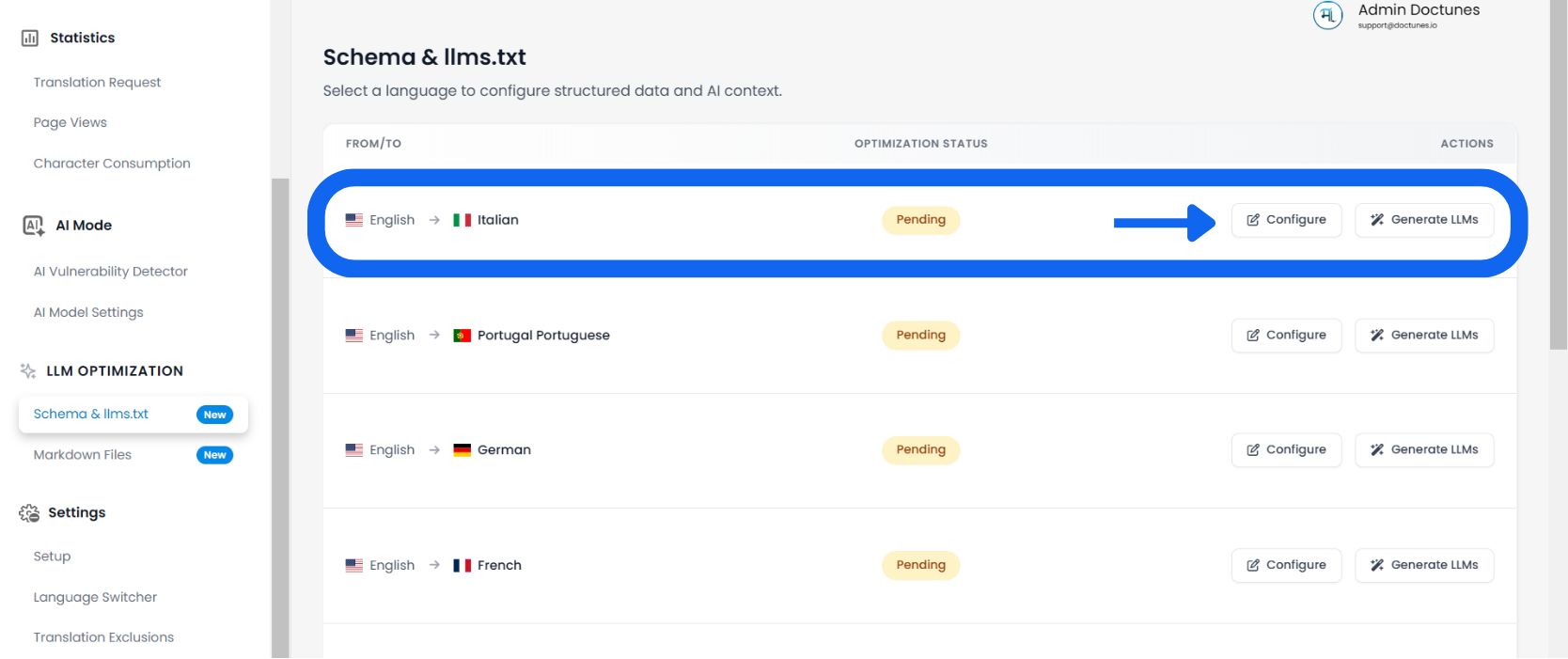
Valitse kohdekieli
Tarkista Optimointitila saraketta (esim. "1 % optimoitu" tai "Odottaa") nähdäksesi, mitkä kielet vaativat huomiota.
Auditointisivun metatiedot
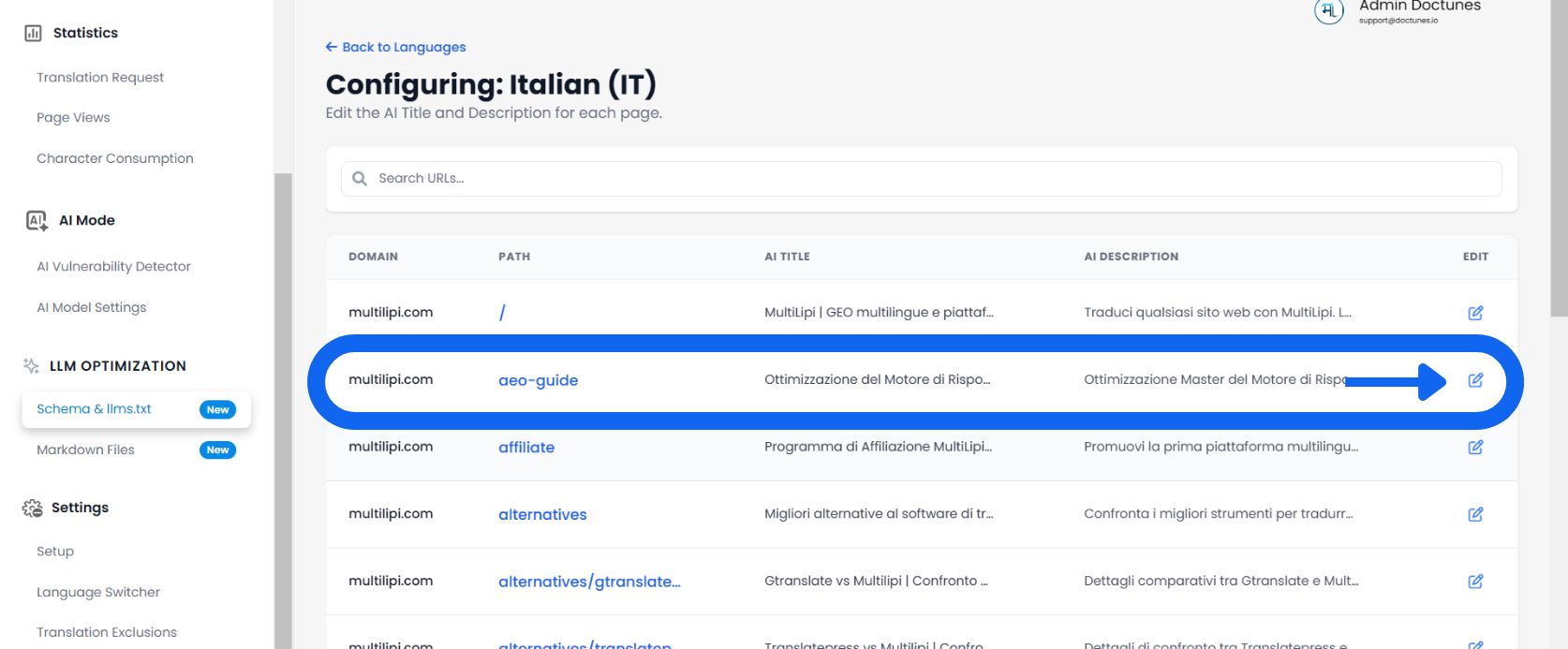
Järjestelmä lataa yksityiskohtaisen luettelon jokaisesta URL-osoitteesta, joka on löydetty sivustoltasi kyseiselle kielelle.
Tarkista sarakkeet:
Sivun tarkka slug (esim. /aeo-opas).
Nykyinen lokalisoidun otsikkotunnisteen, joka tarjoillaan boteille.
Lokalisoidun yhteenvedon, jota käytetään tekoälyn indeksointiin.
Muokkaa ja ohita
✏️ Jos automaattisesti luotu käännös ei vastaa brändisi vivahteita, korvaa se manuaalisesti.
- Napsauta Muokkaa:Valitse Kynäkuvake kohdan vieressä Otsikko tai Kuvaus.
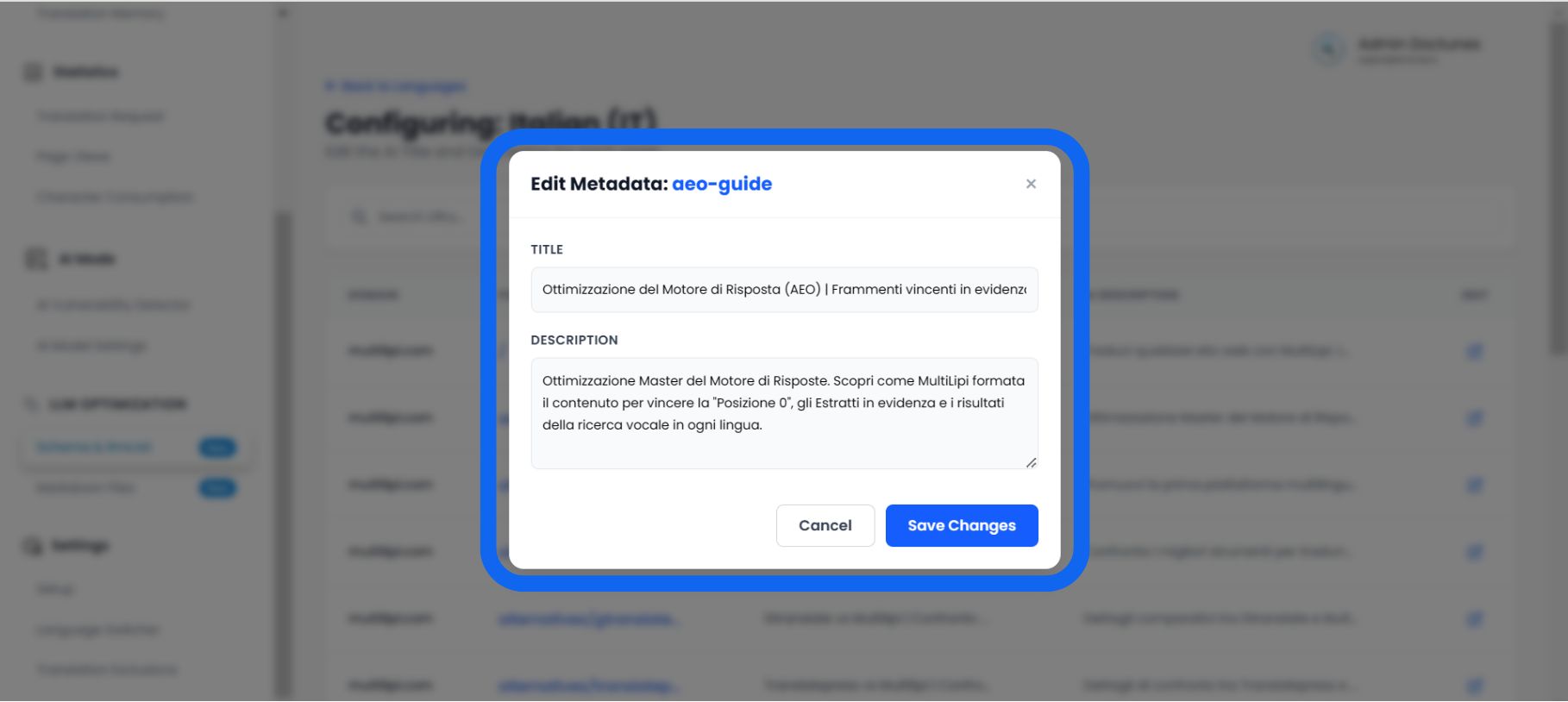
- Editorin modaali:Ponnahdusikkuna otsikolla "Muokkaa skeeman metatietoja" ilmestyy.
- Syötä uudet tiedot:
• Skeeman otsikko: Syötä avainsanoja sisältävä, lokalisoidu otsikko.
• Skeeman kuvaus: Kirjoita jäsennelty yhteenveto (noin 160 merkkiä), joka vastaa suoraan käyttäjän tarkoitukseen.
- Tallenna:Napsauta Tallenna muutokset.
Tulos: Järjestelmä päivittää välittömästillms.txtsyöte ja JSON-LD-merkinnät tällä uudella, kuratoidulla datalla.
Miksi manuaalinen kuratointi on tärkeää
🎯 Älä vain käännä; optimoi.
Vaikka automaattinen käännös on 95 % tarkka, Skeemanhallinta antaa sinun täydellistää viimeiset 5 %, jotka edistävät konversiota.
"Hallusinaatiokorjaus"
⚡ Estä tekoälyä valehtelemasta tuotteestasi.
Tekoälymallit (kuten ChatGPT) usein "hallusinoivat" faktoja, kun niillä ei ole selkeää dataa.
⚠️ Riski
Jos automaattisesti käännetty kuvauksesi on epäselvä, tekoäly voi arvata hinnoittelusi tai ominaisuutesi väärin vastatessaan käyttäjän kysymykseen.
✅ Korjaus
Manuaalisesti muokkaamalla Skeeman kuvaus tässä työkalussa annat "kovan faktan" yhteenvedon. Tämä pakottaa tekoälyn käyttämään sinun kirjallinen määritelmä totuutena, mikä vähentää merkittävästi väärän tiedon mahdollisuutta tekoälyn tuottamissa vastauksissa.