
Globaalissa typografiassa, "Directionality" on kriittinen. Kieliä, kuten arabiaa ja hepreaa, luetaan oikealta vasemmalle (RTL). Jos käännät vain tekstin kääntämättä asettelua, käyttökokemus tuntuu rikkinäiseltä (esim. teksti on tasattu vasemmalle, välimerkit ovat väärässä paikassa).
MultiLipin RTL-moottori on dynaaminen tyylikerros, joka tunnistaa nämä kielet ja "peilaa" verkkosivustosi CSS:n automaattisesti – kääntäen marginaalit, täytteen ja tekstin tasaamisen – varmistaakseen natiivin lukukokemuksen ilman, että sinun tarvitsee kirjoittaa yhtään riviä mukautettua koodia.
1. Tunnistusprotokolla
Mitkä kielet laukaisevat kääntymisen?
Moottori tunnistaa kontekstin. Se aktivoi asettelun peilauksen vain, kun käyttäjä valitsee määritellyn O-O-kielen. Kaikissa muissa kielissä (englanti, ranska jne.) tavallinen vasemmalta oikealle (LTR) renderöinti pysyy aktiivisena.
Tuetut RTL-kielet:
Arabia (ar)
Heprea (he)
Persia / Farsi (fa)
Urdu (ur)
2. Konfiguraatioprotokolla
Peilimoottori käynnistetään.
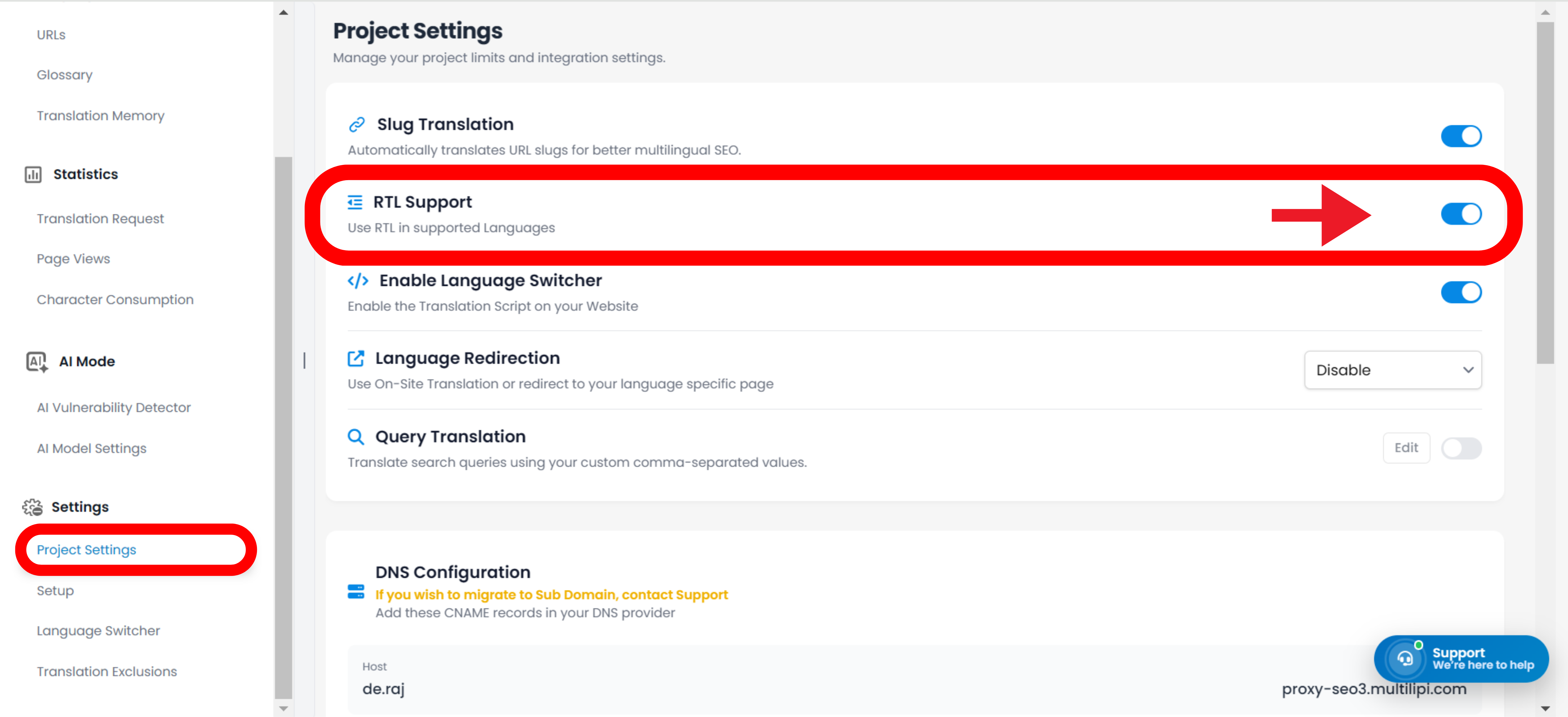
Ota tämä rakenteellinen mukautus käyttöön seuraamalla tätä polkua komentokeskuksessasi:
Vaihe 1: Käytä projektin kontekstia
Kirjaudu sisään MultiLipin hallintapaneeliin.
Valitse tietty projekti, jonka haluat määrittää.
Vaihe 2: Käyttöönotto
Siirry Asetukset osiossa vasemmassa sivupalkissa.
Napsauta Projektin asetukset.
Vaihe 3: Kytke moottori päälle
Vieritä löytääksesi RTL-tuki kytkin.
Toiminto: Vaihda se asentoon PÄÄLLÄ (sininen).
Järjestelmän toiminto: CSS-injektiokerros on nyt aktiivinen.
3. Tekninen toiminta
Miten se toimii selaimessa.
Kun moottori on otettu käyttöön, se suorittaa seuraavat toiminnot dynaamisesti:
Direction-attribuutti
Injektoi automaattisesti dir="rtl" HTML-koodiin <html> tagi, kun RTL-kieli on aktiivinen.
CSS-kääntö
Se "kääntää" käytännössä tavalliset CSS-ominaisuudet.
float: left muuttuu float: right.
margin-left: 10px muuttuu margin-right: 10px.
Vaihtajan integrointi
Jos käytät MultiLipin kielenvaihtajaa, käyttöliittymä kääntyy välittömästi, kun käyttäjä valitsee arabian tai heprean, tarjoten saumattoman siirtymän.
Huomautus: Manuaalisia CSS-ohituksia ei tarvita. Järjestelmä hoitaa geometria-laskelmat automaattisesti.