
1. Auditointiprotokolla
Vaihe 1: Käytä projektin kontekstia
Kirjaudu sisään MultiLipin hallintapaneeliin.
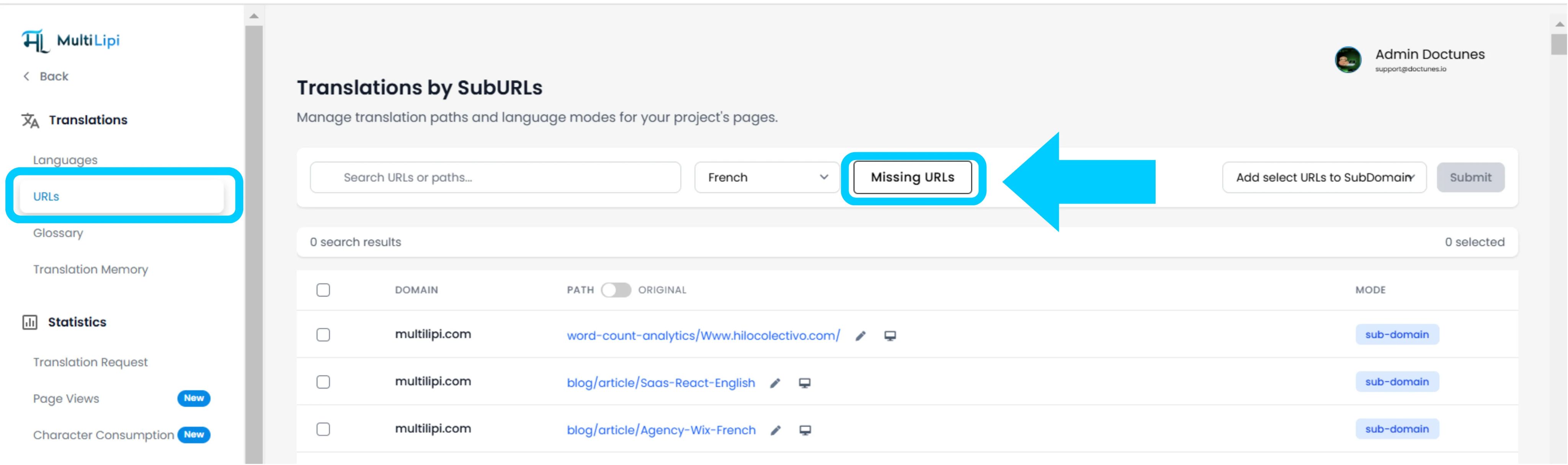
Vasemmassa sivupalkissa, kohdassa Käännökset osiossa, napsauta nykyistä projektiasi avataksesi sen erityisasetukset.
Vaihe 2: Käyttökarttaan pääsy
Projektinäkymän sisällä, napsauta URL-osoitteet vaihtoehto sivupalkissa.
Konteksti: Tämä paneeli näyttää kaikkien tällä hetkellä seurattujen ja käännettyjen polkujen rekisterin.
Vaihe 3: Määritä kohdekonteksti
Etsi pudotusvalikko hakupalkin vierestä.
Toiminto: Valitse tietty kieli, jonka haluat tarkastaa (esim. ranska).
Logiikka: Järjestelmä vertaa nyt lähdeindeksiä (englanti) ranskan indeksiin.
Vaihe 4: Suorita tarkistus
Napsauta Puuttuvat URL-osoitteet -painiketta.
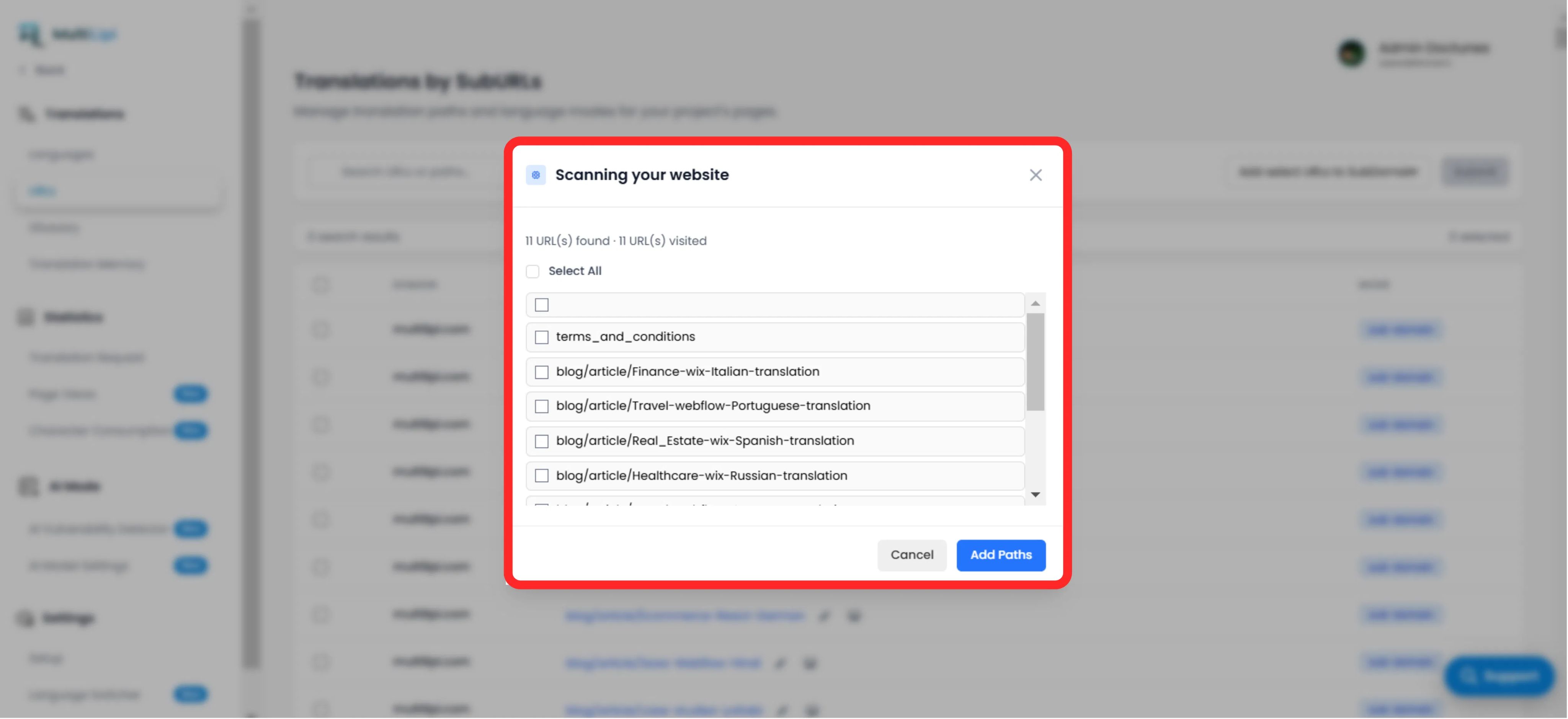
Järjestelmän toiminto: Järjestelmä skannaa lähdeverkkotunnuksesi kelvolliset polut, jotka puuttuvat nykyisestä kielikartasta.
2. Sisäänotto ja synkronointi
Auditoinnin yhteenveto
Näyttää löydettyjen kääntämättömien polkujen kokonaismäärän.
Polkulista
Hienojakoinen luettelo jokaisesta tietystä URL-osoitteesta (esim. /blog/new-feature) kohdekielellä, joka puuttuu.
Korjausprotokolla
Valinta: Valitse manuaalisesti yksittäiset sivut valintaruuduilla tai napsauta "Valitse kaikki" synkronoidaksesi koko erän.
Sitoumus: Napsauta "Lisää polut" -painiketta.
Tulos: Nämä URL-osoitteet lisätään välittömästi käännösjonoon. Järjestelmä luo nyt lokalisoidut versiot ja antaa liikenteen tavoittaa ne.
3. Strategiset edut
SEO-kattavuus
Hakukoneet eivät voi indeksoida sivuja, joita ei ole olemassa. Näiden URL-osoitteiden lisääminen varmistaa, että Google indeksoi koko sivustosi ranskaksi, ei vain etusivua.
Päätepisteiden estäminen
Varmistaa, että jos käyttäjä vaihtaa kieltä syvällä sivulla, häntä ei palauteta etusivulle, koska tiettyä käännöstä puuttui.
Automaattinen tunnistus
Poistaa tarpeen manuaalisille taulukkolaskentataulukoille, joilla seurataan, mitkä blogikirjoitukset on käännetty.
Pro-vinkki
Kun uudet polut on otettu käyttöön, siirry kohtaan AI-tila > Haavoittuvuuksien tunnistin suorittaaksesi välittömän SEO-terveystarkistuksen näille uusille sivuille varmistaaksesi, että ne on optimoitu julkaisua varten.