How to Enable and Manage Slug Translation in MultiLipi
 MultiLipi
•
Jul. 7, 2025
•
5 min lukukokemus
MultiLipi
•
Jul. 7, 2025
•
5 min lukukokemus
Make your URLs multilingual for maximum search engine visibility and a better user experience.
What is Slug Translation?
Slug Translation automatically translates the part of your URL that comes after your domain name—also called the slug (for example, in yoursite.com/about-us, “about-us” is the slug).
When you translate your website into other languages, translating your slugs:
- Improves multilingual SEO—your keywords appear in search results in users’ native languages.
- Increases trust and click-through rates—visitors are more likely to click URLs they can read and understand.
- Creates a more consistent experience—your translated pages don’t have English slugs on non-English content.
With MultiLipi, slug translation happens automatically and can be fine-tuned as needed.
How to Enable Slug Translation
By default, slug translation is turned PÄÄLLE when you set up MultiLipi. You can confirm or change this in a few clicks.
🔹 Step 1: Log into Your MultiLipi Dashboard
- Go to your MultiLipi dashboard.
- Navigate to Settings > Setup
🔹 Step 2: Enable the Slug Translation Toggle
- Locate the Slug Translation section.
- Make sure the toggle is switched PÄÄLLE (the blue position).
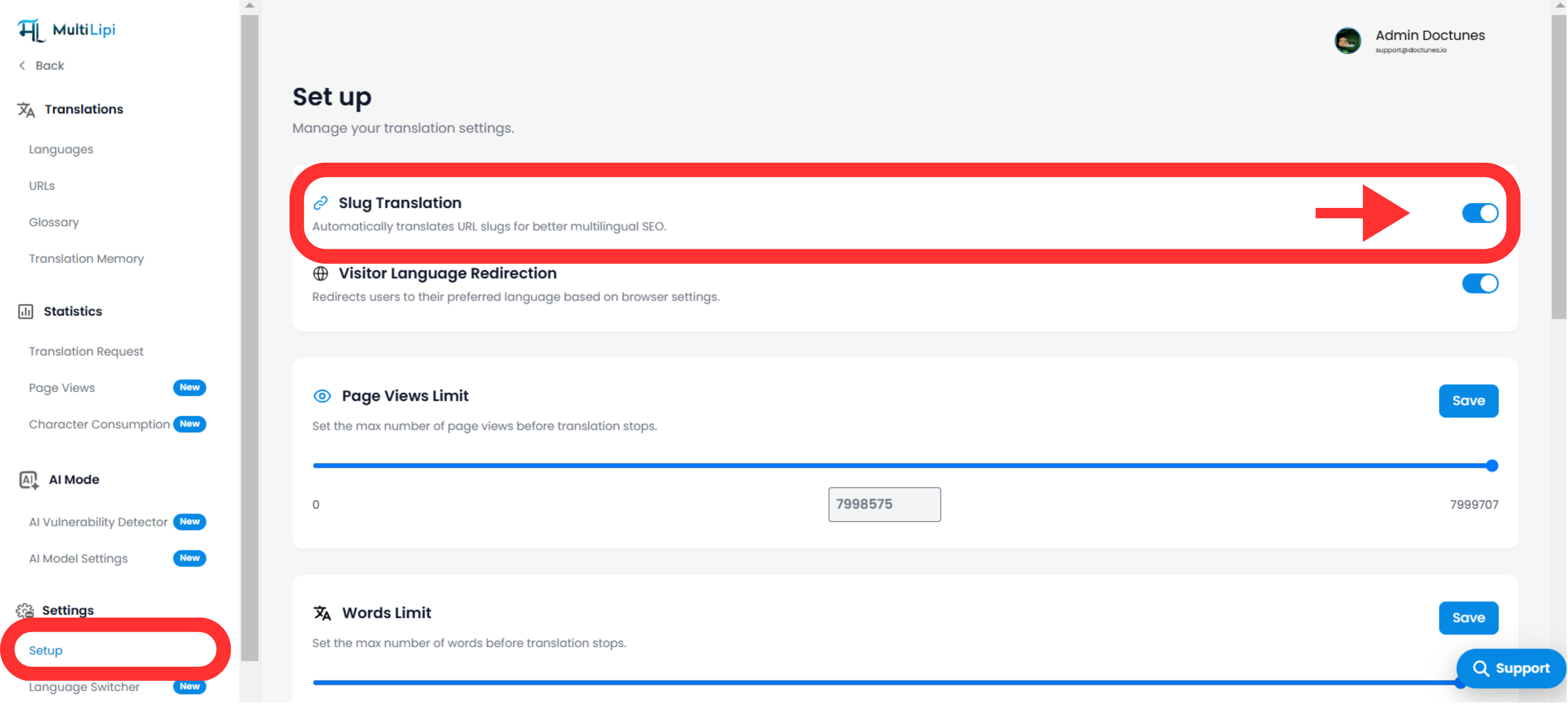
- ✅ ON: Slugs will be automatically translated when new content is published or existing content is updated.
- ❌ OFF: Slugs will remain in the original language.
Vinkki: If you switch it off, your translated content will still appear in other languages, but the URLs will not be localized.
How to Review or Edit Translated Slugs
MultiLipi automatically generates slugs using AI and SEO best practices, but you can manually adjust them:
- In your Translations section, find the page you want to edit.
- Click Edit Slug next to the URL preview.
- Enter your preferred slug in the target language.
- Click Save Changes.
This lets you:
- Align slugs with brand keywords.
- Shorten or simplify slugs.
- Avoid duplicate slugs for similar content.
Best Practices for Multilingual Slugs
To get the most SEO benefit:
✅ Keep slugs concise and descriptive (ideally 3-5 words).
✅ Use hyphens (-) to separate words.
✅ Include a primary keyword relevant to the target language audience.
✅ Avoid special characters, spaces, or overly long slugs.
Esimerkki:
Original slug:
/about-us
French translation:
/a-propos
Spanish translation:
/sobre-nosotros
SEO Benefits of Slug Translation
Enabling slug translation in MultiLipi automatically helps you:
🔹 Appear in local search results for relevant keywords.
🔹 Improve your click-through rate by showing clean, understandable URLs.
🔹 Build a stronger connection with users in each language region.
🔹 Avoid duplicate content issues by creating unique localized URLs.
Usein kysytyt kysymykset
Q: What happens if I change a slug later?
A: MultiLipi automatically updates internal links to use the new slug. We recommend setting up 301 redirects from the old URL to the new one for SEO continuity.
Q: Will slug translation work with my CMS?
A: Yes—MultiLipi integrates with WordPress, Shopify, Webflow, Wix, and any other platform. The translated slug will appear as soon as the page loads in the target language.
Q: Do I need to translate slugs manually?
A: No—MultiLipi handles this automatically. Manual edits are optional if you want to customize further.
Tarvitsetko apua?
If you have questions or want to customize your slug translation workflow, contact our support team. We’re here to help you optimize your multilingual SEO every step of the way.
Kommentit