
Paikallisesta globaaliksi alle 10 minuutissa
Verkkosivustosi lisääminen MultiLipiin tekee enemmän kuin vain kääntää tekstisi. Se rakentaa erikoistuneen "Globaali infrastruktuuri" joka palvelee sisältösi nopean CDN:n kautta, optimoi sen Googlea varten (SEO) ja jäsentää sen tekoälyagenteille (GEO).
Seuraa tätä vaiheittaista opasta päästäksesi "Paikallisesta" "Globaaliksi" alle 10 minuutissa.
Miksi lisätä verkkosivustosi? (3 ydinedua)
Ennen kuin aloitat, tässä on mitä olet avaamassa:
Sivustosi tulee välittömästi indeksoitavaksi uusilla alueilla (esim. fr.yoursite.com), mikä moninkertaistaa avainsanojen sijoitusmahdollisuutesi.
Ottamalla GEO-teknologiamme käyttöön sisältösi muuttuu "luettavaksi" tekoälymalleille, kuten ChatGPT ja Gemini, mikä lisää mahdollisuuksiasi tulla mainituksi vastauksena.
AI-mme mukauttaa sisältösi kohdemarkkinasi tiettyyn toimialaan ja kulttuurillisiin vivahteisiin, ei pelkästään suoraan käännöstä.
Vaihe 1: Tilin luonti ja projektin alustus
Rekisteröidy tai Kirjaudu sisään
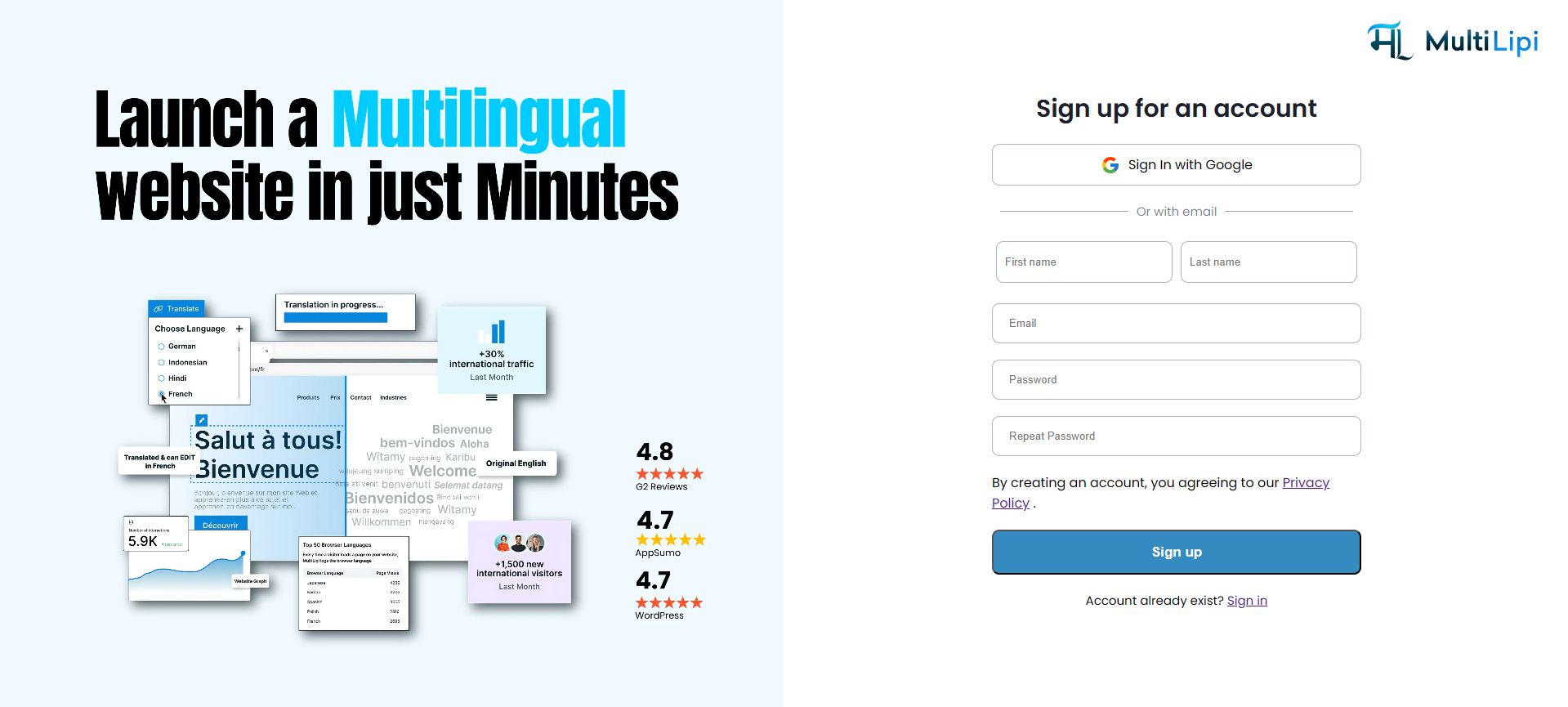
Käytä MultiLipi-alustaa. Voit luoda suojatun tilin sähköpostiosoitteellasi tai kirjautua sisään välittömästi Googlen avulla.
Kuinka tehdä se: Vieraile osoitteessa app.multilipi.com, syötä sähköpostiosoitteesi ja luo salasana tai napsauta "Kirjaudu sisään Googlella" saadaksesi välittömän pääsyn.
Luo uusi projekti
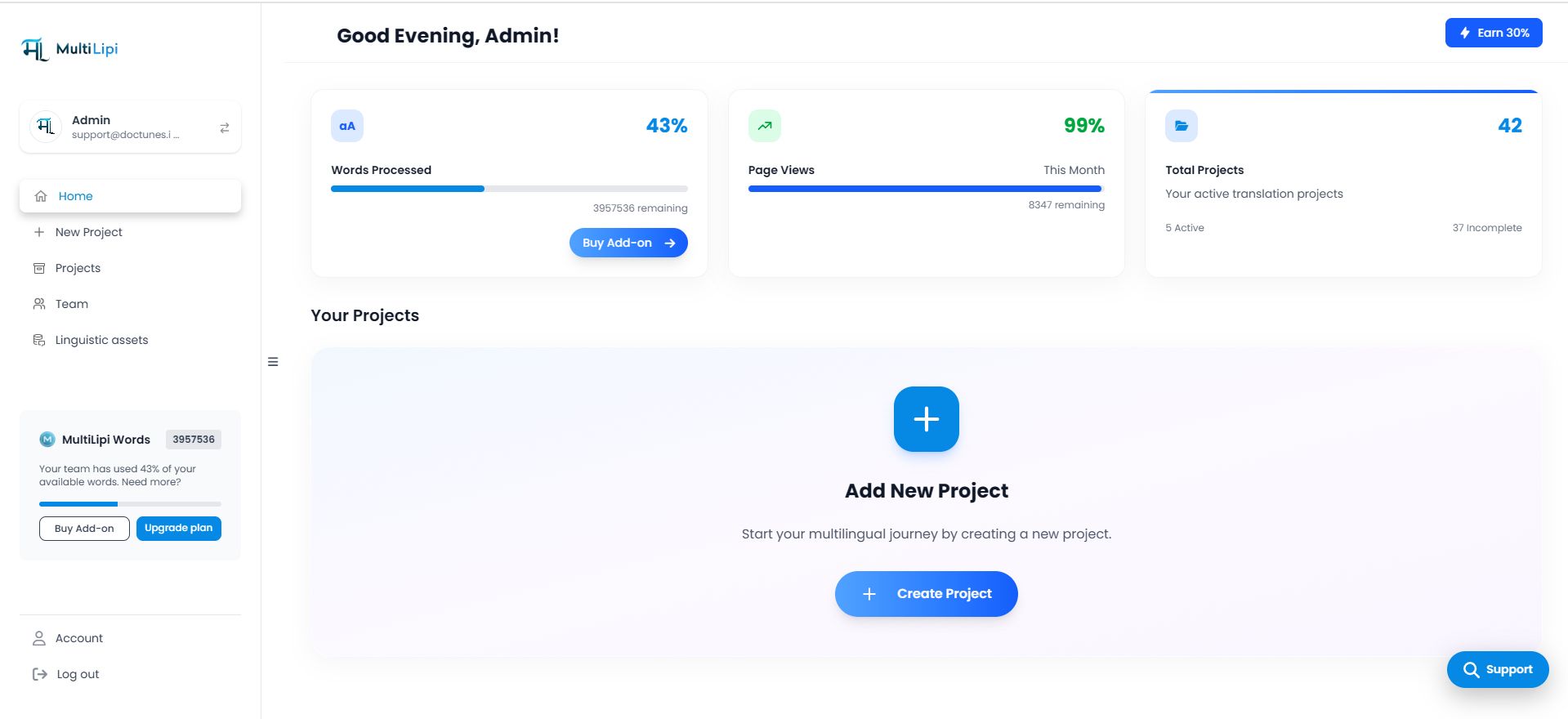
Kun olet kirjautunut sisään pääkoontinäyttöösi, etsi "Lisää uusi projekti" kortti tai napsauta + Uusi projekti painike vasemmassa sivupalkissa. Tämä käynnistää perehdytysvelhon.
Kuinka tehdä se: Etsi kojelaudastasi näkyvä "+ Lisää uusi projekti" -painike tai -kortti ja napsauta sitä aloittaaksesi asetusten määrityksen.
Vaihe 2: Perehdytysvelho
Verkkotunnus- ja bränditiedot
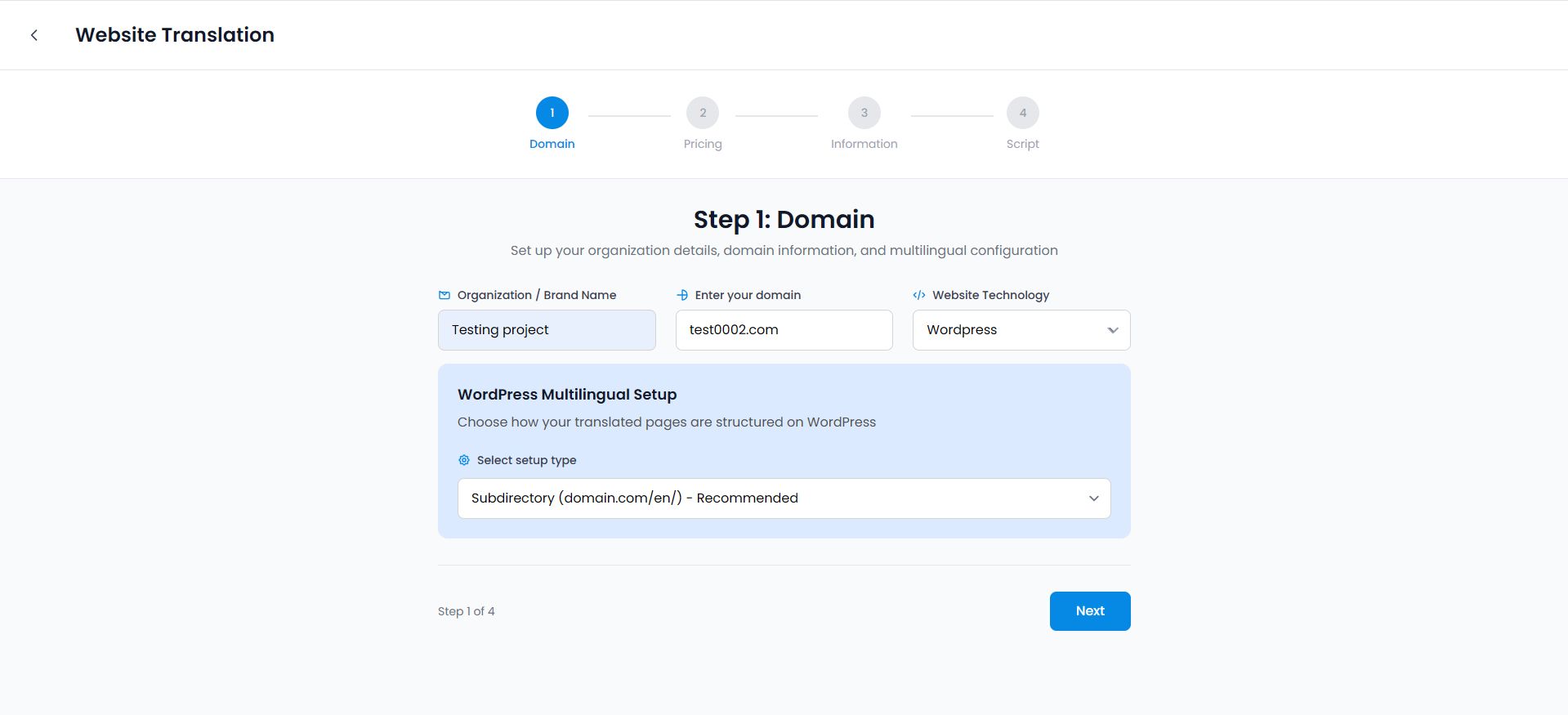
Ensimmäinen näyttö kysyy ydinidentiteettiäsi:
- Organisaation / tuotemerkin nimi: Anna yrityksesi nimi. Tätä käytetään "entiteettien tunnistamiseen" tekoälymalleissa.
- Syötä verkkotunnuksesi: Syötä URL-osoitteesi (esim. test0002.com).
- Verkkosivuston teknologia: Valitse sisällönhallintajärjestelmäsi (esim. WordPress, Shopify, React). Tämä auttaa meitä räätälöimään integraatiokäsikirjoituksen.
- Asennustyyppi: Suosittelemme Alihakemisto (esim. domain.com/fr/) maksimaalisen SEO-auktoriteetin saavuttamiseksi.
Kuinka tehdä se: Täytä jokainen kenttä yrityksesi nimellä ja verkkosivustosi URL-osoitteella, valitse verkkosivustosi alusta pudotusvalikosta ja valitse "Alikansio" asennustyypiksi.
Kieli- ja maantieteellinen määritys (kriittinen vaihe)
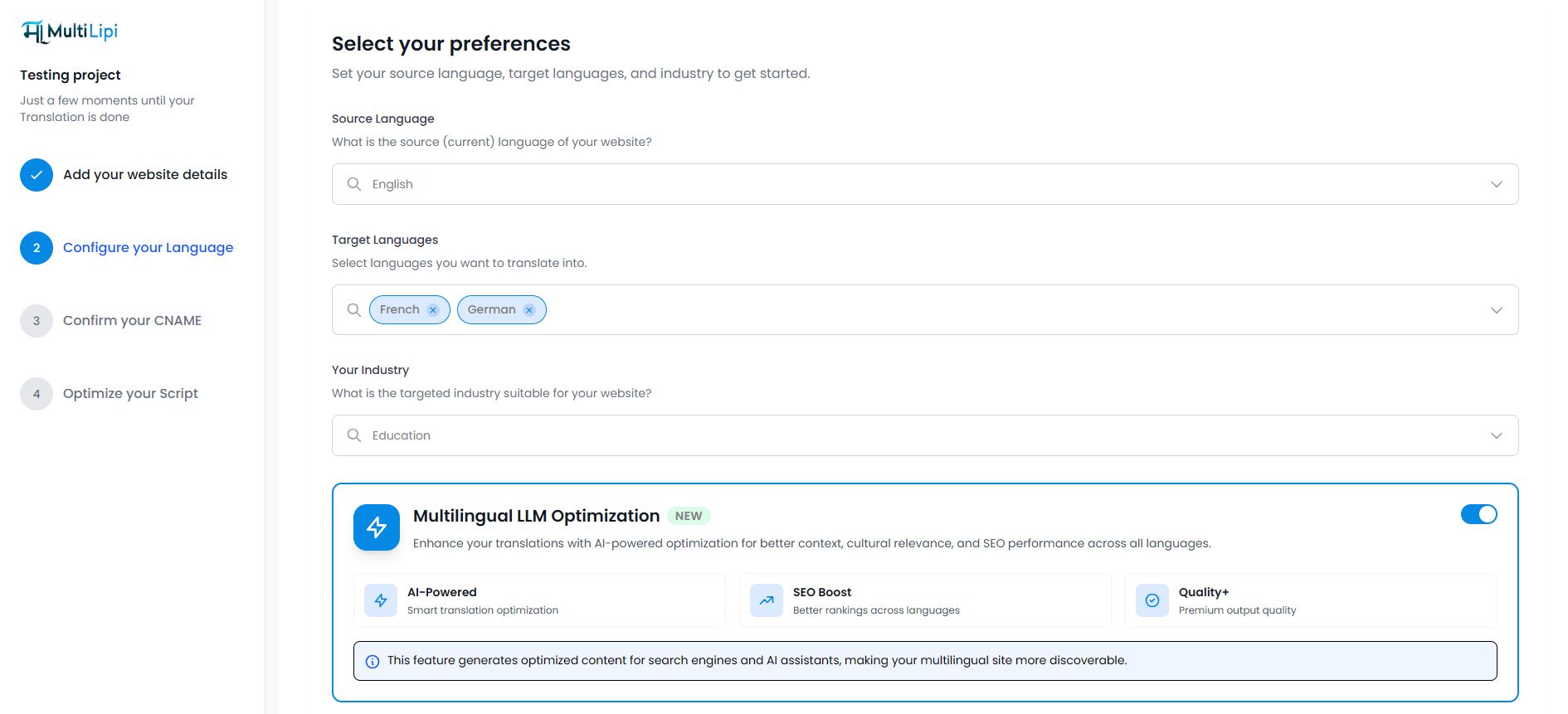
Tässä määrittelet globaalin strategiasi:
- Lähdekieli: Verkkosivustosi nykyinen kieli.
- Kohdekielet: Valitse alueet, joille haluat laajentua (esim. ranska, saksa).
- Toimialasi: Valitse oma erikoisalasi (esim. Koulutus, SaaS). Tämä kertoo tekoälylle, että se käyttää toimialakohtaista terminologiaa.
Kuinka tehdä se: Valitse verkkosivustosi nykyinen kieli pudotusvalikosta, napsauta sitten kieliä, joiksi haluat kääntää, ja valitse yrityksesi toimiala toimitetusta luettelosta.
Älä missaa tämän vaiheen alareunassa olevaa sinistä korttia! Vaihda Monikielinen LLM-optimointi to PÄÄLLE. Tämä aktivoi "GEO-infrastruktuurisi" välittömästi, lisäten AI-luettavan skeeman ja RAG-valmiit kontekstitunnisteet.
Vahvista CNAME (DNS-asetukset)
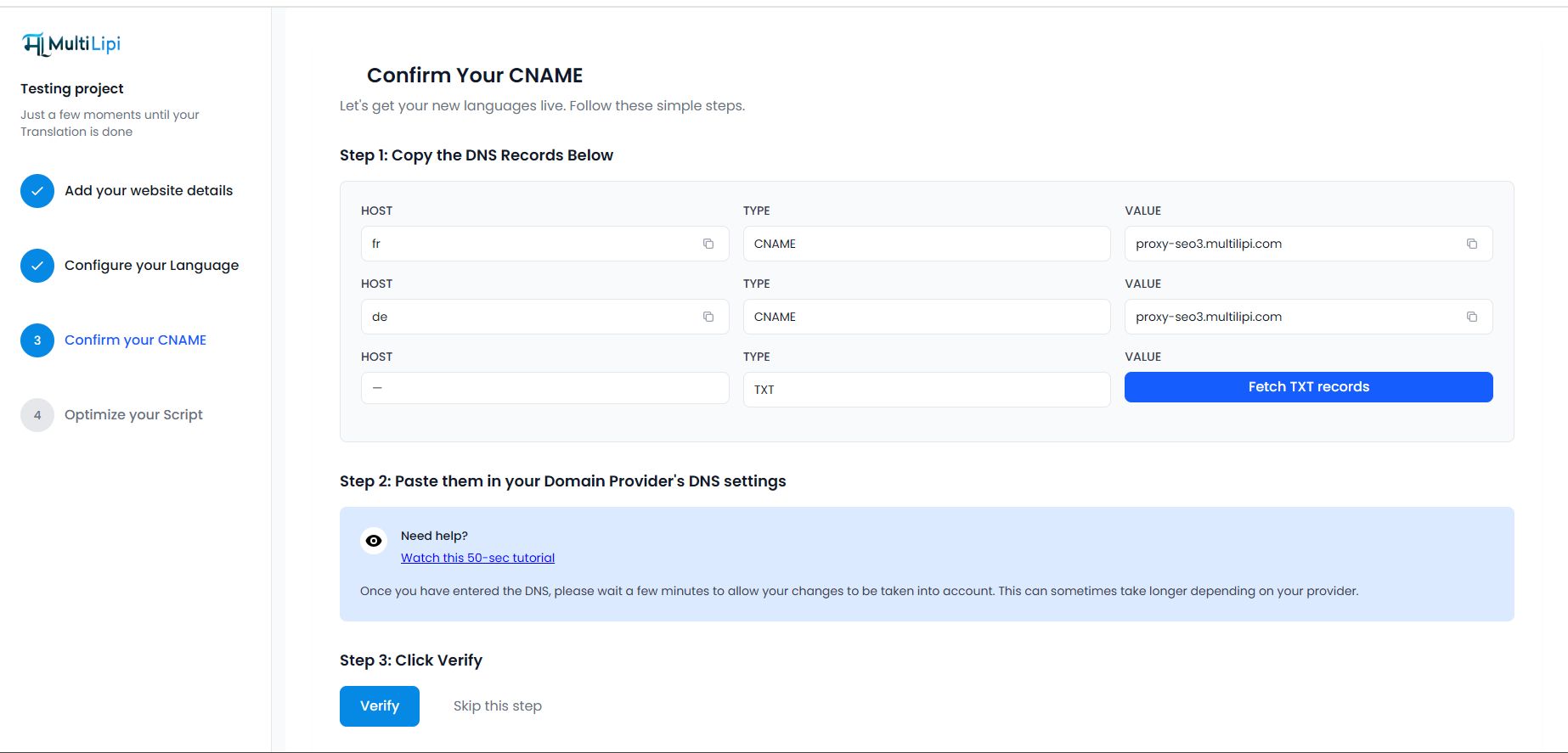
Käännettyjen sivujesi näyttämiseksi omalla verkkotunnuksellasi (esim. fr.omasivusto.com) sinun on vahvistettava omistajuus:
- Kopioi tietueet: Kojelaudassa on erityiset CNAME-tietueet (isäntä ja arvo).
- Lisää palveluntarjoajaan: Kirjaudu verkkotunnusrekisterinpitäjääsi (GoDaddy, Cloudflare jne.) ja lisää nämä tietueet.
- Vahvista: Klikkaa sinistä Vahvista painike. Kun se muuttuu vihreäksi, globaali CDN:si on aktiivinen.
Kuinka tehdä se: Kopioi kojelaudassa näkyvät CNAME-tietueet, kirjaudu verkkotunnuspalveluntarjoajasi DNS-asetuksiin, liitä tietueet sinne ja palaa sitten MultiLipiin ja napsauta "Vahvista".
Optimoi skriptisi
(Jos mahdollista") Lopuksi saat mukautetun JavaScript-pätkän. Liitä tämä verkkosivustosi
-osioon yhdistääksesi live-sivustosi MultiLipi-moottoriin.Kuinka tehdä se: Kopioi näytetty JavaScript-koodi ja liitä se verkkosivustosi HTML:n
-osioon tai noudata alla olevaa alustakohtaista ohjetta.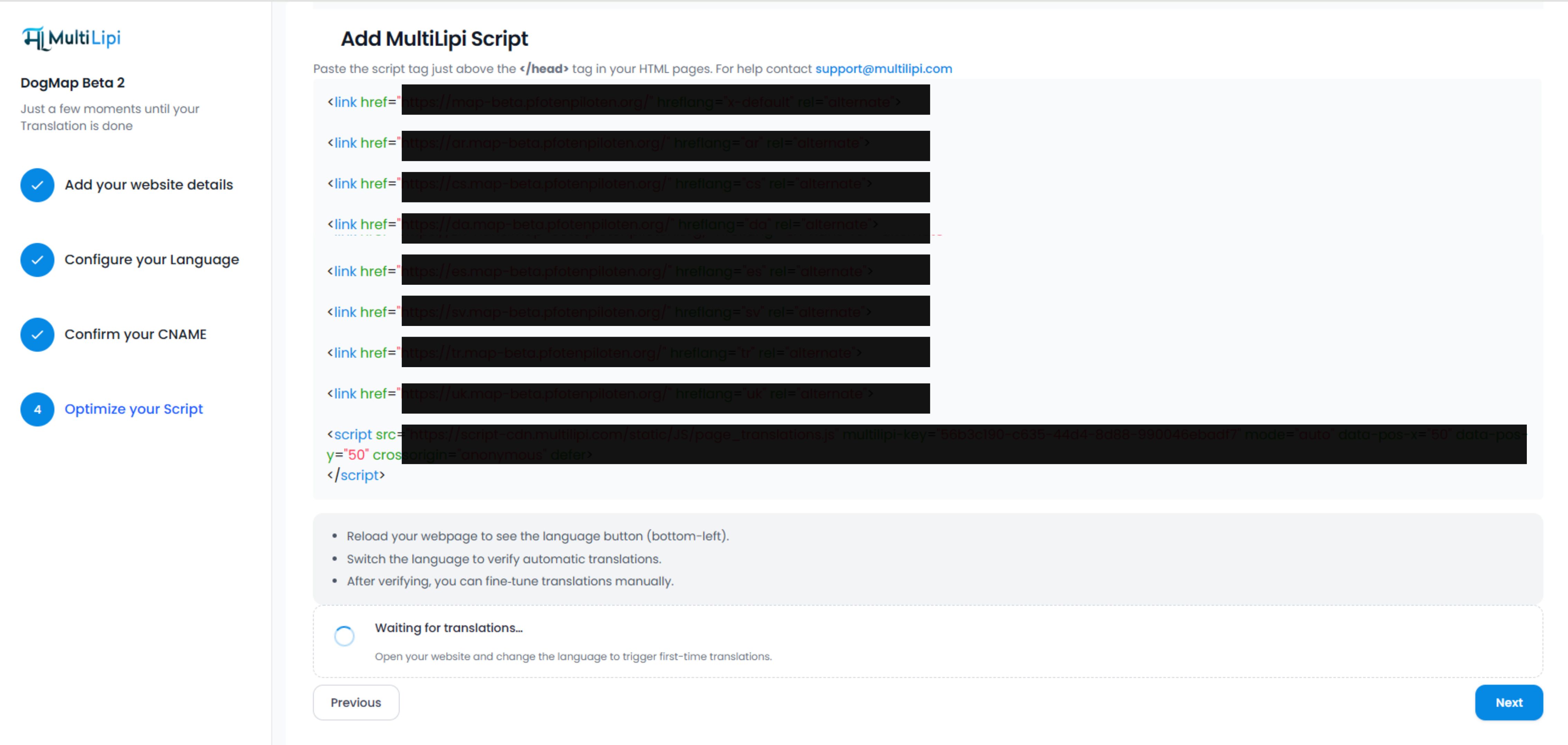
Vaihe 3: Projektin hallintapaneeli ja seuraavat vaiheet
Onneksi olkoon! Verkkosivustosi on nyt julkaistu MultiLipi-hallintapaneelissa. Sinut ohjataan Projektin yleiskatsaus. Tässä on nopea kartta uudesta työtilastasi:
Mikä se on: Reaaliaikainen analytiikka, joka näyttää sivulataukset, käännetyt sanat ja merkkien kulutuksen.
Käytä sitä: Seuraa kiintiösi käyttöä ja liikenteen kasvua.
Näytä analytiikkaopas →Mikä se on: Visuaalinen muokkausohjelmistosi.
Käytä sitä: Katso luettelo kaikista käännetyistä URL-osoitteista ja tarkenna sisältöä manuaalisesti "Visuaalisella muokkaimella".
Mikä se on: Tekoälyn näkyvyyden komentokeskus.
Alitoiminnot: Schema & llms.txt, Markdown-tiedostot, GEO Score Checker.
Mikä se on: Globaali konfiguraatiokeskus.
Käytä sitä: Lisää uusia kieliä, vaihda toimialan kontekstia tai säädä URL-rakennetta.
Mitä seuraavaksi tapahtuu?
Kun olet suorittanut nämä vaiheet, MultiLipin moottori alkaa indeksoida sivustoasi välittömästi. Muutamassa minuutissa käännetyt sivusi (esim. fr.yoursite.com) ovat julkaistuina.
Googlen ja tekoälybottien indeksoitavissa.
Tarkista GEO-pisteet nähdäksesi kuinka hyvin sijoitut tekoälyvastauksissa.